

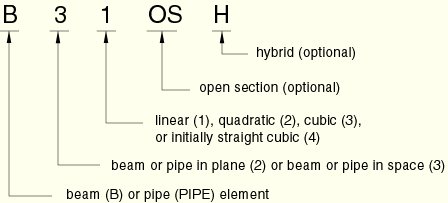
Beam elements in Abaqus are designed to model slender structural components where one dimension (length) is significantly greater than the others. They are ideal for simulating frames, trusses, supports, and piping systems while maintaining computational efficiency. We categorize beam elements based on their dimensionality, integration order, and formulation type. See the figure below for how to name beam elements.
1. Beam Elements in a Plane (2D Analysis)
Standard Beam Elements
- B21: 2-node linear beam element
- B21H(S): 2-node linear beam with hybrid formulation
- B22: 3-node quadratic beam element (higher accuracy)
- B23(S): 2-node cubic beam element (very high accuracy)
- B23H(S): 2-node cubic beam with hybrid formulation
Pipe Elements (2D)
- PIPE21: 2-node linear pipe element
- PIPE21H(S): 2-node linear pipe with hybrid formulation
- PIPE22(S): 3-node quadratic pipe element
- PIPE22H(S): 3-node quadratic pipe with hybrid formulation
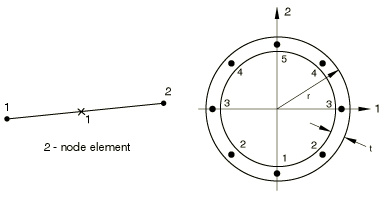
In this picture, you see a 2-node linear pipe element in Abaqus
2. Beam Elements in Space (3D Analysis)
Standard 3D Beam Elements
- B31: 2-node linear beam element (most commonly used)
- B31H(S): 2-node linear beam with hybrid formulation
- B32: 3-node quadratic beam element (for curved beams)
- B32H(S): 3-node quadratic beam with hybrid formulation
- B33(S): 2-node cubic beam element (for very high accuracy)
- B33H(S): 2-node cubic beam with hybrid formulation
3D Pipe Elements
- PIPE31: 2-node linear pipe element
- PIPE31H(S): 2-node linear pipe with hybrid formulation
- PIPE32(S): 3-node quadratic pipe element
- PIPE32H(S): 3-node quadratic pipe with hybrid formulation
3. Open-Section Beam Elements (3D Analysis)
For modeling channel, angle, or I-beam sections with warping effects:
- B31OS(S): 2-node linear open-section beam
- B31OSH(S): 2-node linear open-section beam with hybrid formulation
- B32OS(S): 3-node quadratic open-section beam
- B32OSH(S): 3-node quadratic open-section beam with hybrid formulation
4. Active Degrees of Freedom
Beams in a Plane (2D Elements)
- DOF: 1 (U1), 2 (U2), 6 (UR3)
- Translation: X, Y directions
- Rotation: About Z-axis only
Beams in Space (3D Elements)
- DOF: 1 (U1), 2 (U2), 3 (U3), 4 (UR1), 5 (UR2), 6 (UR3)
- Translation: X, Y, Z directions
- Rotation: About all three axes
Open-Section Beams (3D)
- Additional DOF: 7 (warping degree)
- Includes warping effects for thin-walled open sections
5. Key Features & Formulations
Linear vs. Quadratic vs. Cubic Elements
- Linear (B21/B31): 2 nodes, efficient for straight members
- Quadratic (B22/B32): 3 nodes, accurate for curved beams
- Cubic (B23/B33): 2 nodes, very high accuracy for complex loading
Standard vs. Hybrid Formulation
- Standard Formulation: Uses displacement-based approach
- Hybrid Formulation (H suffix): Uses mixed formulation (displacement + stress)
- When to use Hybrid: For nearly incompressible materials or when stress accuracy is critical
Thin-Walled vs. Thick-Walled Pipe Elements
- Thin-walled: Accounts for hoop strain only
- Thick-walled: Accounts for both hoop and radial strain
6. Selection Guidelines
When to Use Each Element Type
| Application | Recommended Element | Why |
|---|---|---|
| Straight frame members | B31 (3D) or B21 (2D) | Efficient, accurate for most cases |
| Curved beams/pipes | B32 or PIPE32 | Captures curvature accurately |
| High accuracy bending | B33 or B23 | Cubic interpolation for precise results |
| Rubber/composite beams | B31H or B21H | Hybrid handles material constraints |
| Thin-walled sections | B31OS or B32OS | Includes warping effects |
| Pressure vessels/piping | PIPE31 or PIPE32 | Specialized for pipe behavior |
Integration Order Considerations
- Linear elements: Faster computation, may need finer mesh
- Quadratic elements: More accurate, better for coarse mesh
- Cubic elements: Highest accuracy, but computationally expensive
7. Additional Solution Variables
Cubic Beam Elements
- Two additional variables relating to axial strain
- Provides higher accuracy in axial deformation
Pipe Elements
- Thin-walled pipes: 1-2 additional variables for hoop strain
- Thick-walled pipes: 2-4 additional variables for hoop and radial strain
Hybrid Elements
- Additional variables for axial force and shear force
- Linear elements: 2 additional variables
- Quadratic elements: 4-6 additional variables
- Cubic elements: 3 additional variables
8. Best Practices from Mathech
General Recommendations
- Start with B31/B21 for most beam applications
- Use quadratic elements when modeling curved geometry
- Choose hybrid formulation for materials with Poisson’s ratio near 0.5
- Select open-section elements for channels, angles, I-beams
- Use pipe elements specifically for pressure applications
Common Pitfalls to Avoid
- Shear locking: Use quadratic elements for slender beams
- Warping effects: Use open-section elements for thin-walled members
- Material constraints: Use hybrid elements for incompressible materials
- Mesh density: Linear elements may require finer mesh than quadratic
Performance Considerations
- Linear elements: Faster solution, larger models possible
- Quadratic elements: More accurate, fewer elements needed
- Cubic elements: Highest accuracy, use for critical components only
9. Application Examples
Structural Frames
- Element: B31 (linear) or B32 (quadratic)
- Benefits: Efficient modeling of beams and columns
Automotive Chassis
- Element: B31OS or B32OS
- Benefits: Captures warping in thin-walled sections
Piping Systems
- Element: PIPE31 or PIPE32
- Benefits: Specialized for pressure and thermal loads
Composite Beams
- Element: B31H or B32H
- Benefits: Hybrid formulation handles material constraints
Curved Handrails/Arches
- Element: B32 or B33
- Benefits: Quadratic/cubic interpolation for smooth curvature
Conclusion
Choosing the right beam element in Abaqus depends on your specific application, geometry, material, and accuracy requirements. At Mathech, we recommend beginning with standard linear elements (B31/B21) for most applications and upgrading to quadratic or hybrid elements as needed for improved accuracy or special material behavior. Remember that proper beam orientation and profile assignment are just as important as element selection for obtaining reliable results.
Frequently Asked Questions (FAQ) – Beam Elements in Abaqus
Use B31 (linear) for straight beam segments and initial design studies where computational efficiency is important. Use B32 (quadratic) when modeling curved beams, capturing complex bending behavior, or when using a coarser mesh. Quadratic elements are also better for dynamic and vibration analysis where accurate mode shapes are needed.
The “H” suffix indicates a hybrid formulation. Hybrid elements use a mixed formulation (displacement + stress variables) and are essential for modeling nearly incompressible materials like rubber, or when stress accuracy is critical. They prevent volumetric locking that can occur in standard displacement-based elements for materials with Poisson’s ratio close to 0.5.
Choose open-section elements (B31OS/B32OS) when modeling thin-walled open cross-sections like I-beams, channels, or angles where warping effects are significant. Use standard beam elements (B31/B32) for solid cross-sections or closed sections (like pipes) where warping is negligible. Open-section elements include a 7th degree of freedom to capture warping deformation.
Pipe elements (PIPE31/PIPE32) include additional capabilities for internal/external pressure, hoop stress calculation, and specialized output for piping applications. Beam elements (B31/B32) are general-purpose and ideal for structural framing. Use pipe elements for pressurized systems, risers, or piping networks, and beam elements for structural frames, supports, or non-pressurized members.
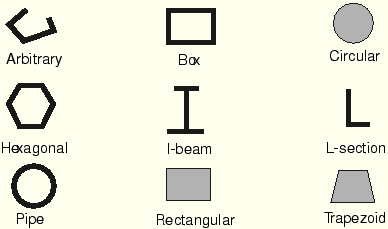
Beam orientation is critical for rectangular and asymmetric sections. When prompted for the n1 direction, this defines the local 1-axis of the beam profile (usually the width direction). For consistent results:

