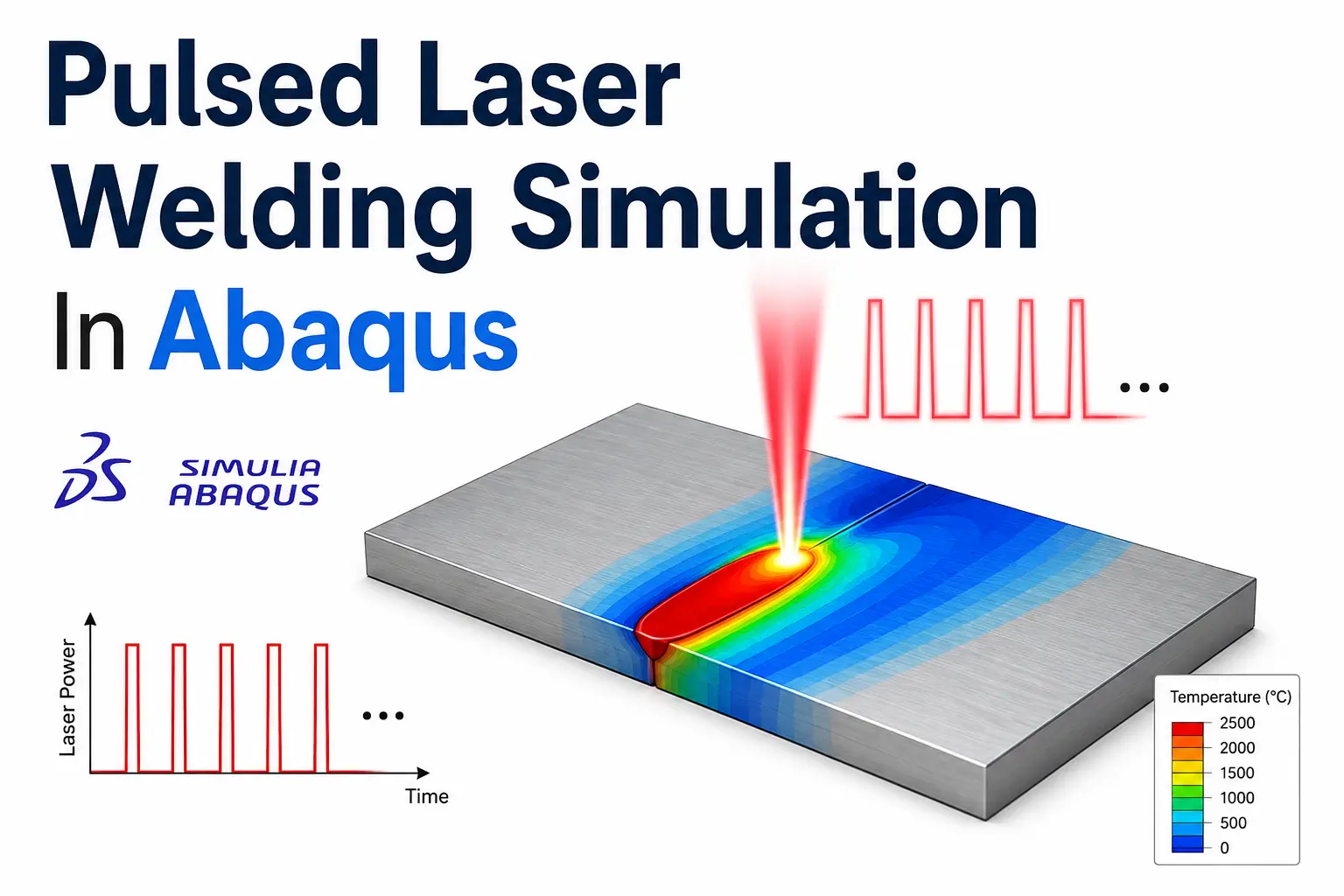
Welding is a complex thermal-mechanical process
that generates residual stresses and distortion in welded materials.
In Abaqus welding simulation, one widely
used approach is the Birth and Death method.
It represents material deposition by sequentially activating finite elements
during the welding process.
The Birth and Death approach is often combined with the
DFLUX Fortran subroutine to define
a moving welding heat source. For arc welding, the heat distribution can be
represented using
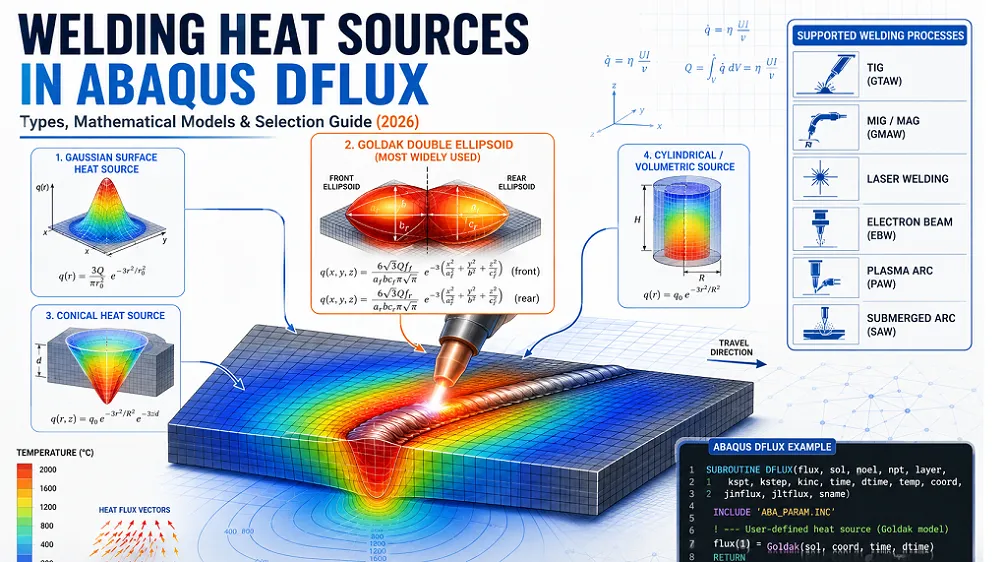
Goldak’s double-ellipsoidal heat source model
.
This article provides a practical guide to implementing the
Birth and Death method in Abaqus
for a single-pass welding simulation.
The model uses Goldak’s heat source and a
DFLUX Fortran subroutine to simulate
the moving heat input and sequential material activation.
Birth and Death
Sequential activation of weld elements.
DFLUX
Moving heat source implementation.
Goldak Model
Double-ellipsoidal heat distribution.
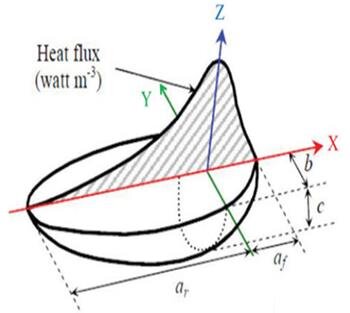
a volumetric heat source in the shape of double ellipsoid, which was first proposed by Goldak (1984), is employed for the simulation
of welding processes like MIG, TIG, etc.
Goldak’s model is widely used to represent the heat flux distribution in welding simulations. It divides the heat source into two regions:
Front Ellipsoid (high penetration region)
Rear Ellipsoid (wider heat distribution)
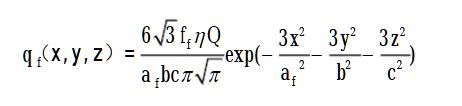
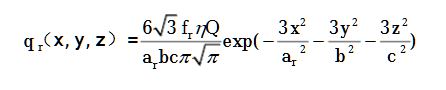
The volumetric heat flux in each region is given by:
Front Heat Source
Rear Heat Source
Where:
total power input (W)
front and rear heat distribution factors
shape parameters of the ellipsoids
coordinates of the heat source
reference position of the heat source
Birth and Death Method
This method simulates the deposition of weld material by activating elements at different time steps.
Initially, weld elements are deactivated (low thermal conductivity or removed).
Elements are progressively activated as the heat source moves.
A Fortran DFLUX subroutine is used to define the time-dependent heat input.
Abaqus Welding Simulation Support
Need Expert Help With Your Welding Simulation?
Get professional support for developing accurate
welding simulations in Abaqus.
We can help with heat-source modeling, DFLUX subroutines,
thermal analysis, residual stress, welding distortion, and
result interpretation.
Tell us about your Abaqus model, simulation requirements, and project goals.
Implementing Welding Simulation in Abaqus
Step 1: Model Setup in Abaqus
Create a flat plate geometry in Abaqus.
Define material properties (thermal conductivity, density, specific heat, elasticity, plasticity).
Partition the weld path into separate element sets (e.g., Weld_Pass1).
Mesh the model using fine elements in the weld region (C3D8T elements recommended).
Step 2: Defining Birth and Death Elements
Deactivate the weld region initially using *MODEL CHANGE, REMOVE.
Activate elements at different steps using *MODEL CHANGE, ADD.
Example:
** Deactivate weld elements initially
*MODEL CHANGE, REMOVE
Weld_Pass1

** Activate weld elements in Step 1
*MODEL CHANGE, ADD
Weld_Pass1
Step 3: Fortran DFLUX Subroutine
The DFLUX subroutine implements Goldak’s heat source equations.
      SUBROUTINE DFLUX(FILM,COORDS,JTEMP,TEMP,TIME,DTIME,NOEL,NPT,
     1 LAYER,KSPT)
      INCLUDE 'ABA_PARAM.INC'
      DOUBLE PRECISION FILM, COORDS(3), TEMP, TIME(2), DTIME
      INTEGER NOEL, NPT, LAYER, KSPT, JTEMP

      ! Heat source parameters
      DOUBLE PRECISION Q, ff, fr, a, b, cf, cr, x0, y0, z0, x, y, z
      PARAMETER (Q=3000.0, ff=0.6, fr=0.4, a=6.0, b=4.0, cf=3.0, cr=5.0)

      ! Heat source center
      x0 = 5.0 * TIME(1)   ! Moving along x-axis
      y0 = 0.0
      z0 = 0.0

      ! Extract coordinates
      x = COORDS(1) - x0
      y = COORDS(2) - y0
      z = COORDS(3) - z0

      ! Compute front and rear heat flux
      FILM = (6.0 * SQRT(3.0) * ff * Q / (a * b * cf * PI * SQRT(PI))) *
     1 EXP(-3.0 * (x**2 / a**2) - 3.0 * (y**2 / b**2) - 3.0 * (z**2 / cf**2))

      FILM = FILM + (6.0 * SQRT(3.0) * fr * Q / (a * b * cr * PI * SQRT(PI))) *
     1 EXP(-3.0 * (x**2 / a**2) - 3.0 * (y**2 / b**2) - 3.0 * ((z - z0)**2 / cr**2))

      RETURN
      END
Step 4: Load and Step Definitions
Define a heat transfer step (*HEAT TRANSFER)
Apply the heat flux using DFLUX
Include cooling and mechanical analysis steps
Example:
*HEAT TRANSFER, STEADY STATE
1.0, 100.0
Step 5: Running the Welding Simulation
Save the Abaqus model.
Compile the Fortran subroutine (abaqus job=weld user=dflux.for).
Run the simulation and analyze the results.
Step 6: Post-Processing
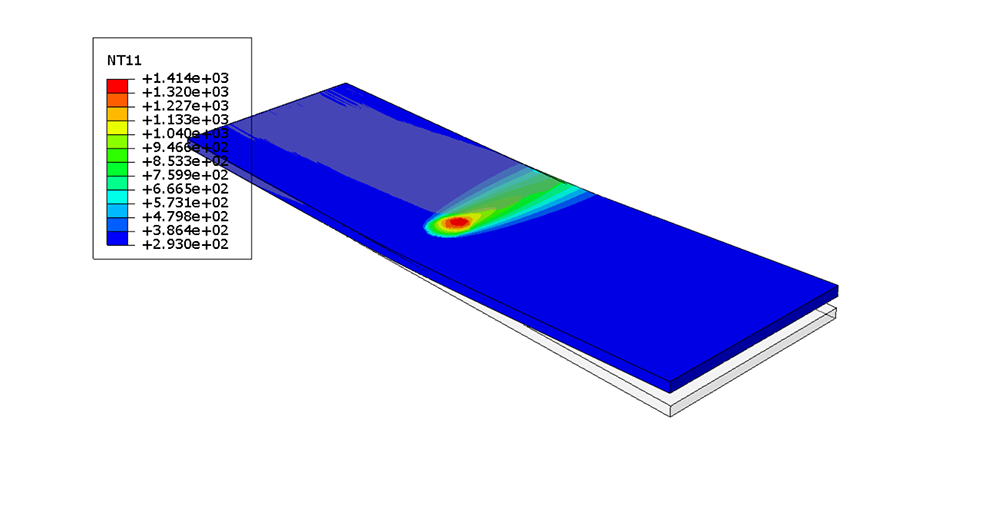
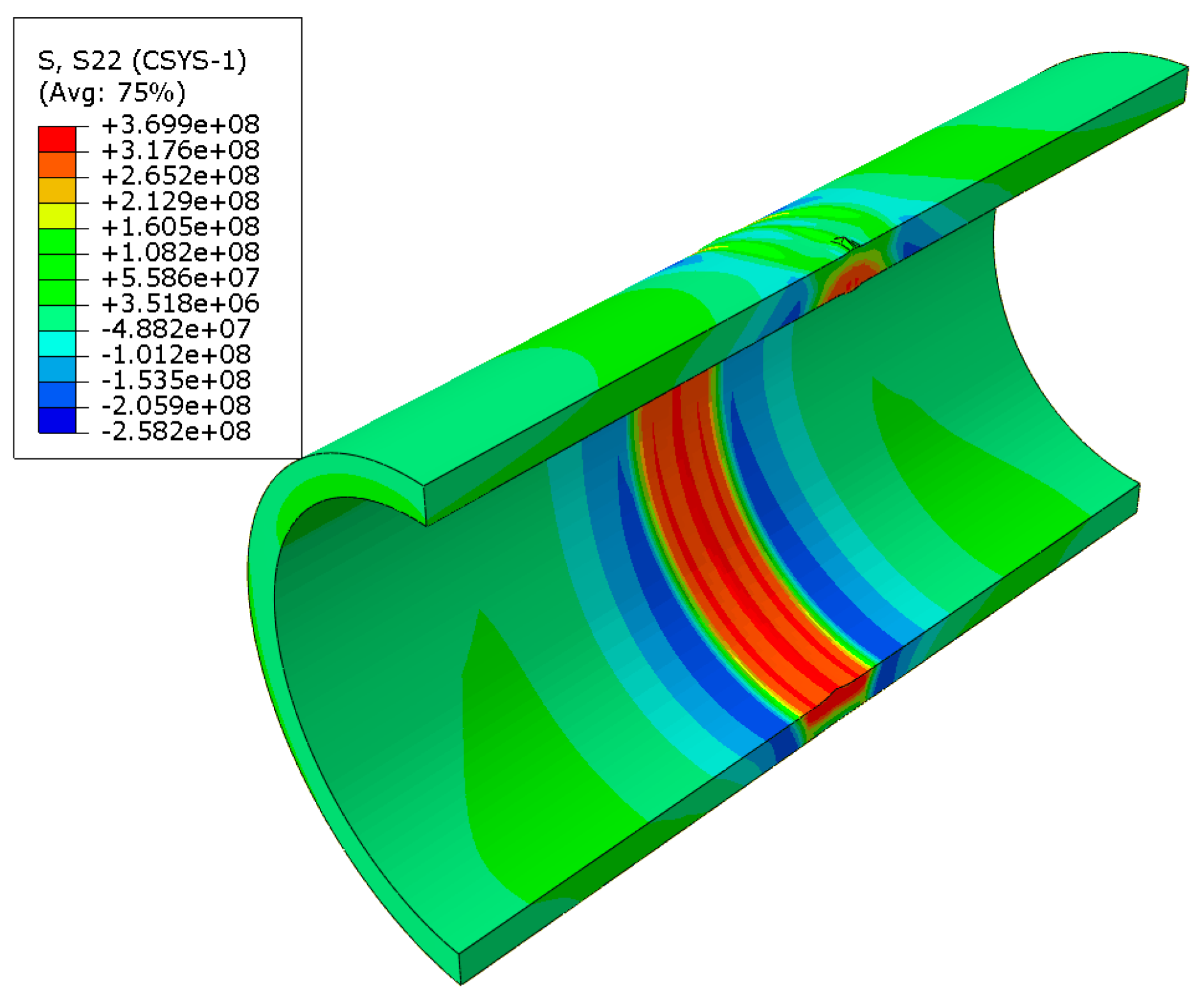
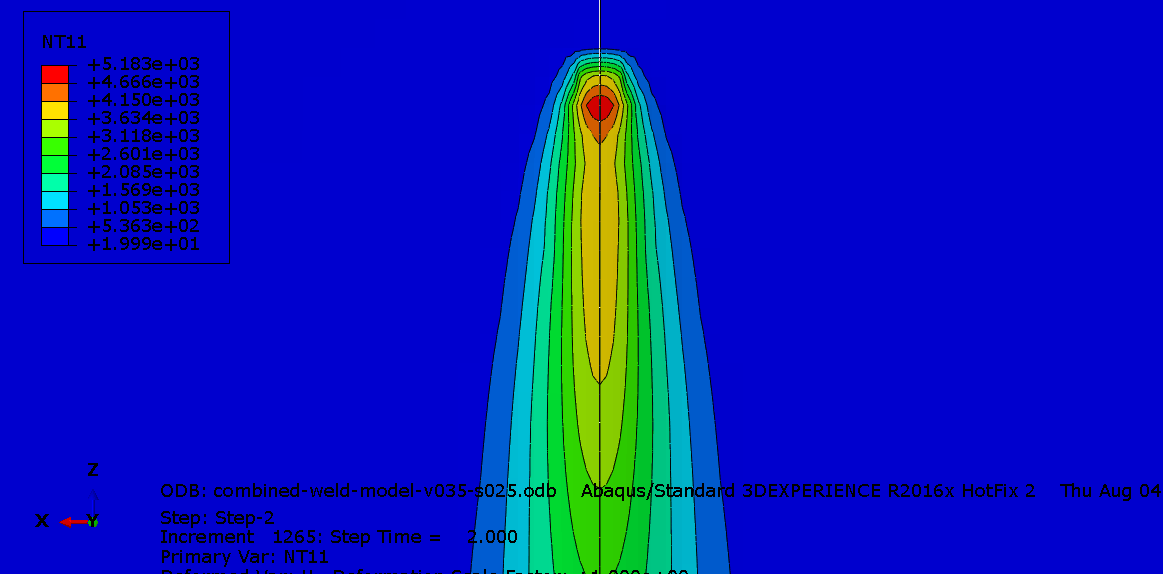
Visualize the temperature distribution.
Plot the thermal cycles at different locations.
Examine residual stresses and distortions.
Abaqus Welding Simulation FAQ
Frequently Asked Questions
Find practical answers about the
Birth and Death method,
DFLUX Fortran subroutine,
Goldak heat source, and Abaqus welding simulation.
01
Abaqus Method
What is the Birth and Death method in Abaqus welding simulation?
The Birth and Death method represents weld deposition by
sequentially activating elements.
Weld elements remain inactive before deposition and become active
according to the defined welding sequence.
02
DFLUX
What is the role of DFLUX in welding simulation?
The DFLUX Fortran subroutine
defines a user-controlled heat flux. It can calculate the position
and intensity of a moving heat source as the welding process progresses.
03
Heat Source
Why is Goldak’s heat source used in Abaqus welding models?
Goldak’s double-ellipsoidal model represents an
asymmetric volumetric heat distribution.
Its front and rear regions provide greater flexibility for reproducing
the thermal behavior of arc welding.
04
Combined Method
Can DFLUX and the Birth and Death method be used together?
Yes. The two techniques perform different functions.
Element activation represents
material deposition, while DFLUX defines the applied moving heat source.
05
Material Data
What material properties are needed for welding simulation?
Thermal analysis generally requires
thermal conductivity, specific heat,
and density. A mechanical analysis also requires properties
such as thermal expansion, elastic behavior, and temperature-dependent
plasticity.
06
Welding Speed
How does welding speed affect the DFLUX heat source?
Welding speed controls how quickly the heat source moves through the model.
For the same power, increasing speed generally reduces the
energy deposited per unit length.
07
Results
Can this method predict welding residual stress and distortion?
Yes. A properly calibrated thermal model can provide input for a
mechanical analysis that predicts
residual stress and welding distortion.
Accuracy depends on material data, heat-source calibration, constraints,
and the welding sequence.
08
Calibration
How should the Goldak heat source be calibrated?
Calibration should compare simulation results with experimental data.
Important targets include
fusion-zone width, penetration depth,
HAZ size, and thermal history. Matching total heat input alone
is not sufficient.
09
Troubleshooting
Why can a DFLUX welding model fail to apply heat?
Common causes include an incorrect heat-source position,
coordinate system errors, inconsistent units, unsuitable time increments,
or a DFLUX condition that returns zero heat flux.
10
Multi-Pass Welding
Is the Birth and Death method suitable for multi-pass welding?
Yes. Different groups of weld elements can be activated for each pass.
The model should reproduce the actual
welding sequence, heat-source path,
cooling period, and interpass temperature.
Need help with an Abaqus welding model?
Get expert support for DFLUX, heat-source modeling,
element activation, residual stress, and welding distortion.
The Birth and Death welding simulation
in Abaqus effectively models the deposition process by activating elements
sequentially. The DFLUX subroutine with
Goldak’s heat source model accurately captures the heat input and
distribution.
This approach helps predict
residual stresses, welding distortions,
and temperature fields, making it a valuable method for advanced
Abaqus welding simulations.
Accurate heat-source calibration, material properties, element activation,
and thermal boundary conditions remain essential for obtaining reliable
results.
Key takeaway:
Combining sequential element activation with a moving DFLUX heat source
provides a practical framework for simulating realistic welding thermal
cycles in Abaqus.
Welding Simulation Resources
More Abaqus Welding Simulation Guides
Explore more practical guides on heat sources, laser welding,
residual stress, welding distortion, and Abaqus simulation techniques.
Looking for more welding simulation resources?
Browse these Abaqus guides to improve heat-source modeling,
thermal analysis, residual-stress prediction, and welding simulation workflows.